18.11.12. My Email Inbox Workflow with OmniFocus
I had one of those mornings where I was dealing with personal morning stuff - exchanging some items with a neighbor, worrying about some odd behaviors from the dog, and the usual flurry of getting dressed and trying to get the dog out for a walk. As this is going on, a rush of emails starts coming in of actions to do for work, on a project that I had done little work on and wasn't immediately prepared to handle. In particular, I was seeing these emails come in on my iPhone where I could do little about it. My first instinct, and action, was to start stressing out a little bit: "Why this project? Why now? What do all of these things mean? Oh crap, is this new email related to another project?" Meanwhile, more emails were coming in and getting grouped together in my inbox in their own stream-of-receipt way.

But then I was able to let go of the stress and let the flood continue. Why?

  1. It's my job to deal with this stuff. There was no bad news or anything here.
  2. I didn't need to deal with it immediately. Just because there was an email on my phone didn't mean that I had to start working. It can be easy to forget this.
  3. I didn't even need to read every email immediately. Once I recognized the pattern, I could just let them pile up like in the old days before constant communication, while still keeping an eye out for anything urgent or that could be answered quickly while waiting for the dog to finish sniffing whatever has her attention while we walk.
  4. I strive to maintain "Inbox Zero", so I didn't need to worry about preserving an unread count as "emails that need processing". Basically, if it's in the inbox, it's awaiting processing. So after reading a couple of these emails and recognizing what was going on, I knew that I could wait until I got to the office to actually deal with them.
  5. I didn't have worry about process or organization. I have OmniFocus, and I knew that it would be easy to turn these static out-of-order emails into actual items that I could process. OmniFocus makes it easy to copy all or part of an email message to its own inbox, but from there I can edit the text, re-order things, start picking apart subtasks, and so on.
  6. Once those items are captured into OmniFocus, I can move those emails out of the inbox and into a project folder, possibly never to be seen again. I can open the original message from OmniFocus if needed. This will bring my Inbox count back down to zero (or near zero).
  7. Now I can actually process all of this information that came flooding in and get things done.
Also, spending time with meditation has allowed me to recognize the silliness of that sudden stress-tick that comes when emails like this start coming in while I'm rushing to finish other things. It made it easier to recognize, as Merlin Mann once said in an episode of "Back to Work" (can't remember which episode), that it's just a new email. I'm not alone in the woods, trying not to be eaten by bears. Instead, I think of the list of things above: "wait, why am I worried about this? I have a process for dealing with this, it'll be OK."

At PyCon 2012, Paul Graham spoke on how he wanted a replacement for email that was really "send me to-dos." I guess for him, most real emails are actionable items and he wants them presented as such. Combining OmniFocus' mail clipping capabilities provides something similar for me, but with me taking an active step in transforming some inbound request into actionable data. I think this works better since not every email is actionable, or its action may be a quick reply. For me, the important thing is to figure out what needs to be done and get all of those messages out of my Inbox and filed away.

If the email is just reference info, or is not related to anything I'm currently doing but may come up again in a few days, I scan it and file it away. If it warrants a quick reply, that is done before filing it away. Longer term reference info is often copied into something like Apple's simple Notes app before filing the original email away.

If the email pertains to something actionable, it tends to go into OmniFocus for further processing. Most of the time this is related to work stuff, but it can also be reminders of something to do at home such as a reminder to download an update to some audio software. OmniFocus' quick entry window makes it easy to assign projects and/or contexts. If it requires deeper thinking, it just goes into the OmniFocus inbox. Then the original email may, of course, get filed away into an appropriate folder.

If the email relates to something like a shipping notification that I want to track, I copy the tracking number into an iPhone app dedicated to package tracking. For a long time, these tended to be the kinds of emails that would stick around in the inbox until the item arrived, but during some shopping sprees or slow-delivery items, I found that the emails were getting distracting. A dedicated app also makes it easier to visually track the status of multiple shipments. Once the shipping info is in the tracking app, the original email is deleted. No need to keep those around for reference.

Receipts get archived immediately to a folder named "receipts". Other emails that are not related to a project or receipt that are not spam are now moved to the "Archive" folder. I'm glad this is a quick action in OS X's mail (I used to keep a generic "reference" folder for this, and turned that into the "archive" folder).

And with all this, I tend to keep my email inbox count to zero or near zero. This makes it easier to process big volumes when they come.

See also: The OmniFocus and GTD White Paper (PDF). My personal system is not full GTD, but the basics are there and the core inbox-processing workflow is well diagrammed and discussed in this paper.


Labels: , , , ,

3.11.12. On iPad Sizes
With the launch of the iPad Mini, Apple's 7.9" iPad, there seems to be a lot of "this is the future of the iPad" or "this is the iPad we'll all use" comments in various reviews I've read. Without having used one, I'll say differently.

When the iPad was announced in January 2010, there seemed to be a lot of discussion about whether the iPad was a device for consumption or creation, and about whether it could be a suitable laptop replacement. Nearly 3 years into the iPad era, there seems to be a consensus that this device is suitable for creation and it can be a laptop replacement or alternative for many. It is also an absolutely terrific machine for consumption of both text and media, but I think that it's usefulness as a creativity machine has surprised many.

I believe this is strongest at the 10" side. I think that the iPad Mini will be a nice creative machine, but early reviews and indications seem to indicate that people are finding it most useful as a "pick up and read/search/view" machine. The Mini is something they can use while pacing around and talking on the phone. It's smaller and lighter, which some say "is exactly what we all want out of our devices" (while at the same time everyone is saying the iPhone remains too small and should be bigger, and the oddly sized Samsung Galaxy Note has a surprisingly good number of fans).

Personally, I want my iPhone to be the size that it is. It fits well in my pocket, where it spends a lot of its time. I can keep it in my pocket when laying on the couch or in bed for a mid afternoon weekend nap, and it does not bother me the way bulky old cell phones did in the past. But I fear that if it were any larger, it would feel uncomfortable like a Moleskine notebook. I think the iPhone is the perfect size.

Likewise, I think the iPad's full size is also perfect for me. Let me list the ways I use my iPad:

  • OmniFocus. As a developer, my work desktop has a lot of apps and windows open, and keeping on top of my best laid plans was mildly annoying until the iPad came along. I do my planning on the iMac, entering in things I need to do to get some piece of work done, and then use the iPad as a separate dedicated screen for keeping on top of that list and marking things off. For a while, I was actually using a laptop for this, as that separate, dedicated screen makes it easier to find and reference what needs to be done when there are so many noisy resources needing my attention on my main work machine.
  • Reading. I eat at my desk a lot, either with local take-out or sack lunches from home, and the iPad, mounted on my Compass iPad Stand, makes for terrific reading and is a good size for at-desk reading whether using Kindle, iBooks, InstaPaper, DC Comics, The Economist, or the web itself. I know the "mini" size is supposed to be better for reading, but the 10" iPad is great for its placement and distance on my desk at lunch time.
  • Twitter. A wonderful, horrible distraction that is just a couple of swipes away while I'm working.
  • Writing. I'm writing this on my iPad on a crowded but cozy CB2 metal desk in the kitchen area of my loft. The 10" size works great for writing with iA Writer, Blogsy, the built-in Notes app, etc. The not-much-smaller 7.9" is probably fine, but for me, I no longer need a MacBook Air now that I've finally added a selectively-used keyboard to my iPad. Laptop replacement? You bet. I'm not programming on it, but I know now that I could probably use this with apps like Diet Coda to get some work done from home needed, although I do have good full-computer fallbacks for that.
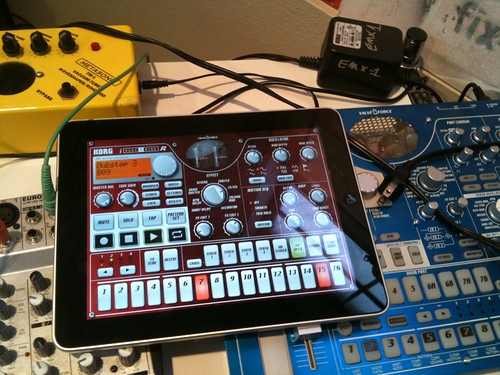
  • Music. There are some terrific music apps for the iPhone and iPad, and the good iPad ones are quite terrific. Again, I find the larger screen works well for those apps. Some apps like the Korg iElectribe come close to matching the physical size of the full Electribe machines. The iPad is not yet an indispensable piece of my music setup, but it's a fun and useful addition on occasion.
There is also a lot of heavy consumption use in the evening as an IMDB and Twitter lookup machine while watching movies or TV that could possibly be served just as well by the iPad Mini, but the occasional video consumption (Netflix, Hulu, iTunes movies, HBO Go) also seem like they're better suited to this larger screen.

So for me, this 10" iPad is just fine. All of this talk about how we'll all be using 7 to 8" tablets is like saying we'll all be using the 11" MacBook Air and no one will use the 13"; or that no one will use a 15" laptop when there is a 13" available; or that no one will use a 42" TV when there is a 32" available. It all depends on need, use, and budget. Or as Horace Dediu says, it depends on the job(s) for which you're hiring the device.

I have never seen so much pointless talk over a device taking on an additional size as with the launch of the iPad Mini. It's just another size. It's not the second coming of the iPad, nor is it the doom. In my mind, there's nothing that exciting about the iPad Mini at all. I'm not saying its a bad device, it's just what it is: a smaller iPad.

Wake me up when there's a 13" iPad and iOS finally grows support for intelligently dealing with different scales and dimensions.


Labels: , , , ,

5.3.10. iPad, Periodicals, and Purchase Options

Apple has announced an iPad ship date of Apr 3 for the wi-fi only edition, with the 3G model slated for late April. Pre-orders start next week.

I'm hoping for good magazine content, and I would be willing to pay. The web often sucks for magazine content as obtrusive advertising, annoying pagination (often in support of more obtrusive advertising), and random encounters with pay walls get in the way. And it just sucks to read on a computer screen. It's not the LCD display, but the position and layout of the screen that is frustrating.

I've had subscriptions to The Economist, The New Yorker, and Harper's in the past, and I'm starting to miss them as I've been trying to make more time for reading. The weeklies, especially, are the ones I would like to have electronically if I could pay on a month by month basis. Sometimes it's hard to keep up when life gets busy, and those weekly magazines can pile up quickly.

Finally, I'd love for the magazines to work offline. Then I think I could totally buy into the wi-fi only iPad. I'm already sold on the iPad, just can't decide which model to get. I don't leave the house or travel too often, and the iPhone is often good enough when I am out like that. But having the 3G as a pay-as-you-go option for the iPad could be handy on those occasional small trips.

Still, I think that when I take the train from SLC to DEN later next month, I will be much happier with traditional books and cameras than with a gadget, no matter how cool the gadget is. It's nice to just turn things off for a couple of days.

I think I just talked myself into the wi-fi only iPad.

Labels: ,

16.7.08. OmniFocus Revisited

I've been using OmniFocus for a while now on my Mac, and made occassional use of it's predecessor, Kinkless GTD. As an implementation of the "Getting Things Done" method, or just as a personal "what am I doing?" manager, OmniFocus 1.0 was pretty good. I, personally, liked it better than the alternatives I tried, but some of that may be due to familiarity with the OmniOutliner heritage. And OmniOutliner remains one of the greatest Mac OS X applications ever written. I believe it's one of the greatest outliners ever written. Sure, it doesn't have Mind Mapping support and it can't run a slideshow (although its data can be exported to OmniGraffle or Keynote). OmniOutliner is a joy because it's fast, beautiful, ridiculously easy to use, while still having a fair amount of power and flexibility. Kinkless GTD was actually a set of AppleScripts that made OmniOutliner act like a specialized GTD application (which OmniFocus now does natively).

But when it came to OmniFocus, I only used it at work, and even there I only used it intermittently. But with the 1.1 "Sneaky-Peek" version of the desktop client (still under development), OmniFocus supports synchronization via MobileMe or any WebDAV server. This not only enables me to share this information between the office, home, and the rarely used laptop, but it enables sharing with the awesome new OmniFocus for iPhone.

Second only to the iTunes Remote, OmniFocus for iPhone is the coolest mobile application I've seen so far on this young platform. OmniFocus for iPhone (or iPod Touch) can synchronize over Wi-Fi, Edge, or 3G. That alone makes it very useful. Cooler still is that it's location aware. "GTD" has a strong concept of contexts. A project may require picking up supplies at an office supply store, assembling at home, and mailing out items at the post office. With OmniFocus, you can add location information to any context. This location information may be based on where you currently stand (using Location Services), on a manually entered address, on an address from a Contact record, or on a business search. Then when looking at the "By Location" screen in OmniFocus, available actions get grouped by their location in relation to where you currently stand. "Grocery Store: 1 Mile; Post Office: 3 Miles..." Very Cool.

This is the first electronic implementation of GTD that actually appears usable. Even if you don't follow GTD religiously (I certainly don't), the projects/contexts combination is an effective way of organizing actions. The location-aware contexts in OmniFocus for iPhone help answer the question "what can I do based on where I am?" When used well, it should make it harder to forget those little items that you needed to do or pick up for some small project.

Labels: , , ,

12.7.08. iPhone 2.0 and the iTunes Remote

Like many others, I was bit hard by the server failure that crippled the big iPhone 2.0 update process this morning. It robbed me of said morning, and I opted to take the day off work. It's been a bit of a tough week, and last night I did my first show in months, and had company over until past 3AM afterwards. Since things are about to get crazy at work, I decided that I needed a day to catch back up on sleep while waiting for my phone to work again.

A few hours later, the phone worked.

One of the most surprising and enjoyable elements is the iTunes Remote. Full and comprehensive access to my fairly large iTunes library on the iMac: all playlists, etc, with the ability to control volume, jump around in songs, see artwork - just like the 'iPod' iPhone application! Sometimes, particularly in the morning, I might turn on Front Row and carry the nice little Apple Remote around with me to have some control over songs while getting dressed in the upstairs loft, but using the remote from up there often required reaching far over the edges and trying to point the remote in the direction of the iMac, just to be able to skip forward a track or two.

But now, I can control it all from the iPhone, without needing a line of sight! In fact, this might be what pushes me to pick up an Airport Express or two (one for speakers in said upstairs loft, maybe one to bring music out on the patio or the bathroom). Full access and control of 29 and a half days of available music playable out of real speakers and controlled by an untethered iPod size device - beautiful.

Labels: , ,

10.6.08. Looking to a Snow Leopard Winter.. er... Summer.

I’m a bit excited about Mac OS X “Snow Leopard”. Few user-visible changes, with a focus on fine-tuning and giving developers better access to capabilities of modern hardware. It appears that Apple’s experience in making a lightweight Mac OS X “Core OS” for the iPhone will also drive this release.

One of my favorite operating system releases was OS/2 “Warp” (OS/2 3.0). OS/2 2.0 was a fascinating creature - completely divorced from Microsoft, OS/2 2.0 delivered an aggressively object-oriented runtime built on SOM (a desktop implementation of some of CORBA 1.x, I believe). It was radically different from Window 3.x. It’s hardware requirements were a bit high for the times, but it was a solid OS.

What impressed me about OS/2 3.0 “Warp” was that it’s system requirements were in some cases significantly LESS than OS/2 2.0, while performing better. I don’t know of any majoro user-visible adjustments (this was before operating system releases became the giant dog’n’pony shows that have been expected since both Windows 95 and Mac OS X).

I think that even though desktop and laptop hardware continue to get better, the rapid growth rates seen between 1995 and 2005 are slowing down. Now the pressure is on connectivity, portability, and storage storage storage for all of those mp3s and movies and photos. I think both Windows XP and Vista, along with Mac OS X 10.4 and particularly 10.5 have been a bit cavalier about their usage / expectation of resource availability without doing a good job of cleaning up afterwards. Removing a ‘TemporaryFiles’ folder used by Apple’s “Soundtrack Pro” program gave me back 25 GB of disk space. 25GB! I expect that when doing lossless audio work, I’m going to leave a lot of turds behind. But not that many. That’s an accumulation over only a few months. Now some of that may have been due to crashes brought on by the instability in Mac OS X 10.5.2’s audio subsystem (particularly in relation to some USB audio devices). But still - 25 gig! Over the course of just a couple of months!

I think that Apple is at a good place to do this. Good housekeeping is required - otherwise you end up with situations like Mac OS ‘Classic’ or even Windows Vista, where there is so much old baggage, bad hacks, outdated mentalities, etc, all in play; it makes it difficult to move the platform forward. Some companies and developers have always been mindful of this, electing to keep their products lean and fast, always (see Ableton Live - hands down, the most impressive audio application out there). Other companies don’t support that philosophy for whatever reason - backwards compatibility, rush to market, a combination of the two, etc.

This far into the Mac OS X life cycle, there’s not many new dog’n’pony features to add. The API’s have stabalized, the developer tools offer more than they ever have (Interface Builder 3 is a terrific update), the Finder and Spotlight are actually fast and usable; applications and utilities from both inside and outside of Apple are going to really shine on Mac OS X 10.5 with all that it offers to developers. A new age of PDA’s are upon us, whether it’s a device like an iPhone, an ultra-mobile Asus Eee-PC style portable, or even the Macbook Air: secondary and tertiary devices are really taking off.

I think that an underlying aspect part of the ‘Snow Leopard’ plan is to allow such devices, made by Apple (naturally), to proliferate. When it was announced that the iPhone was built on Mac OS X, I was surprised - Mac OS X has been a pretty wasteful OS - or at least, one that would consume more resources than realized (often for caching, interestingly enough). A standard install is full of crap that may be useful, but often takes up space. How many gigabytes of printer drivers now? To take the fine tuning and resource management ideas from the iPhone variation of OS X into the main system is what I think will allow for Apple to finally make the Eee PC style portable that everyone wanted the Macbook Air to be.

I’m putting my money on some kind of small device, priced around $600-$800, coming out at or around the same time as Snow Leopard. Combined with Mobile Me and Snow Leopard Server’s increasingly Exchange-like feature set (but better priced and more understandable for small organizations), the ubiquitous-data-access capability is there.

Today’s full-featured laptops (MacBooks, Inspirons, whatever) are their own entities; my aging iBook gets used rarely as I just don’t have as much data or software set up on it, and it’s sometimes too big of a pain to keep in sync.

The XO and Eee-PCs (or whatever they’re called) are also separate from the rest of one’s life; useful as a fun or educational toy, or as a geek’s favorite gadget to see what they can get running on such a little device. Most of the other developments I’ve seen in this area have centered around “how cheap and how small can we make a laptop/portable that will run (Linux/Windows XP)”. But outside of education, if this is the only focus being given, then these companies are going to be making nothing more than the next round of casual gadgets that get tossed or buried after a few months - especially if a key factor of what made Palm devices so popular (for a while) is completely neglected.

The Macbook Air is deliberately designed as a complementary computer, using the master’s optical drive even. While sexy, I think the Macbook Air misses the mark on a few items. But I think it’s an indication of things to come - laptops deliberately designed to complement your main machine. Smaller devices, from the Palm to the iPhone, have done this. And they’ll also be designed to work with your (or your company’s) data, which the Blackberry has done (and the iPhone will do when its new ‘enterprise’ support rolls out). Getting this onto other devices, without being constrained to an enterprisey system like Notes or Outlook, is where things really appear to be headed. It’s certainly something that I’d like to have. And the more I look at Snow Leopard, the more I believe that Apple is sneaking ahead of the crowd into delivering this into the hands of consumers. They’re skating to where the puck is going to be.

Granted, Windows “Live Mesh” looks to be heading in the same direction. But after Vista, Microsoft needs to reign in the Windows kernel and distribution. Windows Server 2008 and some of what has been leaked (or speculated) about “Windows 7” seem to indicate that Microsoft is aware of this. And how could they not be? But I think that even with their vast resources, Microsoft has a long ways to go to catch up - even though it appears that they’ve been playing in this area (tablet computing, ultra-mobile pc’s) for a while. A deep cleansing of the Windows core is desparately needed. And then a deep re-implementation of the UI may be needed.

Apple had a terrific luxury (and great idea) with the iPhone. While sharing the same kernel and many same APIs as the desktop (and server) Mac OS X, it has an entirely new UI that is dedicated to its intended use. Windows CE, on the other hand, tried to bring the Windows 95 look and feel to tiny devices and now I’m really not so sure it was a good idea. It allowed Microsoft to punt on some usability and design issues by falling back on the way things work on the desktop. I still see this, even in some of the newest and fanciest “iPhone killers”: some of these have a very fancy launcher app; some even have a very fancy phone and contact app that spins around in 3D and responds to gestures. But then, suddenly, you’re in the tiny-font, tiny-scrollbar, pixelated, stylus-driven world of the interior. It’s like going into a grand building like The Plaza (back when it was a hotel, at least), and finding the inside full of grey linoleum floors, flickering flourescent lights, and cinderblock walls reminiscent of an old hospital or elementary school. Quite the let-down (a lot of courthouses are like this, actually).

I also think Apple was smart to NOT have an SDK at the launch of the iPhone. I bet they would have liked one, but I think the iPhone had to launch when it did, and perhaps not-quite-everything was ready yet. If one looks back at the classic Macintosh and Palm devices and operating systems, you see systems that pulled of very clever hacks to fit within the price and size constraints of the time. The Lisa was much more than a $10,000 Macintosh - it had many features from power management to an OpenDoc style multi-tasking document based UI. But to offer those features, it was priced well out of reach. The Macintosh squeezed as much as it could down into a 128K Ram machine, and the compromises they had to make in order for that to work would end up haunting the company until its near-death. The Palm, too, took the ideas of the Newton and other tablet devices and stripped them down into a size and price point approachable by the masses. And like Apple, the design decisions that were made to make that work have crippled the Palm OS so much that even Palm sells half of its devices with Windows CE (or whatever CE is called these days). Those compromises are bad enough to deal with on your own - but when having to support third party developers and then provide some degree of backwards compatibility, it can just kill you.

By taking the time to put the SDK into beta, to polish up the OS and its APIs, I think Apple will avoid a repeat of that story. Instead of having to support every little exposed compromise that may have been made to get the iPhones out the door last June, Apple could tidy them up. By using a beta period for the SDK and next major release of the software, Apple can respond to feedback and make changes and adjustments before they become permanent.

Labels: , , , ,