5.11.12. iPad and the Incase Origami Workstation
The iPad writing station experiment continues. The latest addition is the Origami Workstation by Incase. This is a simple case for the Apple Wireless Keyboard that folds out into a supportive structure for holding an iPad. When I started this project, I was using the Apple Smart Cover to support the iPad in a landscape position, like a laptop. The Origami Workstation supports the same thing, but it supports placing the iPad in any orientation. iA Writer looks great in both, and it can be nicer and even more like a piece of paper to type in portrait, which is what I'm trying now.

I have yet to try even commuting with this keyboard, as it's not something I need at work. I use the iPad at the office, but don't do very much typing. Any input that I need on the iPad at work comes in via various cloud/sync solutions like OmniFocus, Notes, and iCloud. Still, I'm going to toss the keyboard and this case in the backpack tomorrow to see how it feels and fits. The aluminum keyboard is not small, and packing it around could start to mitigate the advantages of the iPad. However, I think the case will be a nice occassional throw-in for going to a neighborhood coffee shop (waiting on a new one to open in a couple of months) or maybe travel when I want to do some writing.

This makes me recognize some of the appeal of Microsoft's Surface and Windows 8 strategy, which is to promote a laptop/tablet hybrid. With this keyboard, I'm closer to that situation. I have more thoughts on this that I plan on posting in the future.

For this post regarding the Origami Workstation case and the Apple Wireless Keyboard, the takeaway is that this is a nice piece of kit that seems to compare favorably with other iPad keyboard/case combinations. Some other combinations combine the keyboard into the iPad case, and I don't like those. While I like having a keyboard for my iPad, it's not something I need for most of the day or evening. With the Origami Workstation, my keyboard is protected and put away most of the day and isn't taking up any more space. It does take up more space when it is in the backpack, but again it's not something I plan on taking with me daily. Integrated case-keyboard solutions also tend to force you into landscape mode - even the Microsoft Surface's savvy design does this. While this isn't necessarily bad, I do find that when writing long bits of text, portrait mode can be a much more natural fit. Since the Origami Workstation just unfolds into a supportive triangle, the iPad can be propped in either orientation. The iPad can even stay inside most cases that you can put on it.

It's also pretty easy to pop the keyboard in and out of the case. This is nice since I might want to use the keyboard on my lap while keeping the iPad on my desk. This is like the iMac where I can place the keyboard wherever is comfortable, independent of the display - something you can't do with laptops or integrated keyboard cases.

Finally, the Apple Wireless Keyboard is great. It's what I use on all of my iMacs, and is the same layout as on my (aging) MacBook. I'm used to the feel and spacing of these keys. The Origami Workstation lets me stay with that keyboard while letting me use the iPad like a laptop, desktop, or tablet as much as I want. The main downside is size, as the keyboard is taller than the iPad, and thicker due to its use of AA batteries. Since I expect to mostly use this at home, that's not a big deal. It's still a pretty compact setup.

The cost of the Apple Wireless Keyboard ($69 USD) and Incase Origami Workstation ($29) matches nicely with most of the top integrated keyboard case solutions which seem to average around $99-$129. This pairing is excellent for anyone wanting to do long writing on the iPad.

Labels: ,

3.11.12. On iPad Sizes
With the launch of the iPad Mini, Apple's 7.9" iPad, there seems to be a lot of "this is the future of the iPad" or "this is the iPad we'll all use" comments in various reviews I've read. Without having used one, I'll say differently.

When the iPad was announced in January 2010, there seemed to be a lot of discussion about whether the iPad was a device for consumption or creation, and about whether it could be a suitable laptop replacement. Nearly 3 years into the iPad era, there seems to be a consensus that this device is suitable for creation and it can be a laptop replacement or alternative for many. It is also an absolutely terrific machine for consumption of both text and media, but I think that it's usefulness as a creativity machine has surprised many.

I believe this is strongest at the 10" side. I think that the iPad Mini will be a nice creative machine, but early reviews and indications seem to indicate that people are finding it most useful as a "pick up and read/search/view" machine. The Mini is something they can use while pacing around and talking on the phone. It's smaller and lighter, which some say "is exactly what we all want out of our devices" (while at the same time everyone is saying the iPhone remains too small and should be bigger, and the oddly sized Samsung Galaxy Note has a surprisingly good number of fans).

Personally, I want my iPhone to be the size that it is. It fits well in my pocket, where it spends a lot of its time. I can keep it in my pocket when laying on the couch or in bed for a mid afternoon weekend nap, and it does not bother me the way bulky old cell phones did in the past. But I fear that if it were any larger, it would feel uncomfortable like a Moleskine notebook. I think the iPhone is the perfect size.

Likewise, I think the iPad's full size is also perfect for me. Let me list the ways I use my iPad:

  • OmniFocus. As a developer, my work desktop has a lot of apps and windows open, and keeping on top of my best laid plans was mildly annoying until the iPad came along. I do my planning on the iMac, entering in things I need to do to get some piece of work done, and then use the iPad as a separate dedicated screen for keeping on top of that list and marking things off. For a while, I was actually using a laptop for this, as that separate, dedicated screen makes it easier to find and reference what needs to be done when there are so many noisy resources needing my attention on my main work machine.
  • Reading. I eat at my desk a lot, either with local take-out or sack lunches from home, and the iPad, mounted on my Compass iPad Stand, makes for terrific reading and is a good size for at-desk reading whether using Kindle, iBooks, InstaPaper, DC Comics, The Economist, or the web itself. I know the "mini" size is supposed to be better for reading, but the 10" iPad is great for its placement and distance on my desk at lunch time.
  • Twitter. A wonderful, horrible distraction that is just a couple of swipes away while I'm working.
  • Writing. I'm writing this on my iPad on a crowded but cozy CB2 metal desk in the kitchen area of my loft. The 10" size works great for writing with iA Writer, Blogsy, the built-in Notes app, etc. The not-much-smaller 7.9" is probably fine, but for me, I no longer need a MacBook Air now that I've finally added a selectively-used keyboard to my iPad. Laptop replacement? You bet. I'm not programming on it, but I know now that I could probably use this with apps like Diet Coda to get some work done from home needed, although I do have good full-computer fallbacks for that.
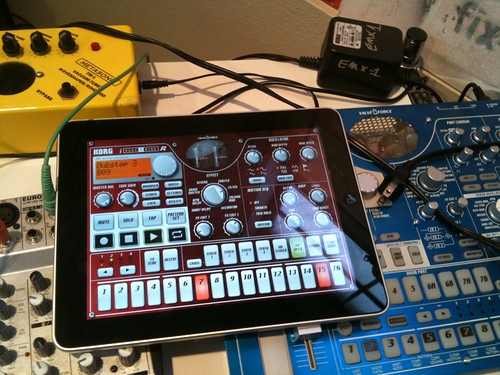
  • Music. There are some terrific music apps for the iPhone and iPad, and the good iPad ones are quite terrific. Again, I find the larger screen works well for those apps. Some apps like the Korg iElectribe come close to matching the physical size of the full Electribe machines. The iPad is not yet an indispensable piece of my music setup, but it's a fun and useful addition on occasion.
There is also a lot of heavy consumption use in the evening as an IMDB and Twitter lookup machine while watching movies or TV that could possibly be served just as well by the iPad Mini, but the occasional video consumption (Netflix, Hulu, iTunes movies, HBO Go) also seem like they're better suited to this larger screen.

So for me, this 10" iPad is just fine. All of this talk about how we'll all be using 7 to 8" tablets is like saying we'll all be using the 11" MacBook Air and no one will use the 13"; or that no one will use a 15" laptop when there is a 13" available; or that no one will use a 42" TV when there is a 32" available. It all depends on need, use, and budget. Or as Horace Dediu says, it depends on the job(s) for which you're hiring the device.

I have never seen so much pointless talk over a device taking on an additional size as with the launch of the iPad Mini. It's just another size. It's not the second coming of the iPad, nor is it the doom. In my mind, there's nothing that exciting about the iPad Mini at all. I'm not saying its a bad device, it's just what it is: a smaller iPad.

Wake me up when there's a 13" iPad and iOS finally grows support for intelligently dealing with different scales and dimensions.


Labels: , , , ,

1.11.12. A few more thoughts on iA Writer

A day into the iA Writer experiment on my iPad and iMacs, and these are some quick thoughts:

Good: iCloud Support. I like Dropbox, but there are situations where iCloud documents just make more sense to my brain. I haven't had any strange behaviors yet, whereas some Dropbox based apps that I use on both my Mac and iPad do exhibit annoying behaviors. I like that I can have the same document open on multiple devices and that the document itself gets updated in place. I'm not trying to write on multiple devices at the same time, but I don't like getting funny "(saved on …)" files when I forgot to close a window or document on a device. I like OS X Mountain Lion's iCloud document management window within the app, and it's very easy to drag files in and out to file things away in the larger file system (including Dropbox via its OS X Finder Integration).

On iOS, iA Writer also supports Dropbox, but I have not tested it yet.

Good: Simple Interface. This is the first "distraction free" simple writing app that I've enjoyed since the original WriteRoom 1.0 (I didn't like future versions as much). It's very easy just to write, whether in windowed mode or full screen. Writing this in full screen on my iMac right now doesn't feel much different than writing on my iPad with a bluetooth keyboard last night.

The default (and only) font is quite nice on all platforms.

Mediocre: Markdown Links. While inline-style Markdown links are OK, I like the footnote style when I'm just writing things down and want to pile up a list of links to collect later at the bottom of the document. I'm interested in iA Writer as a blogging tool and like that I can compose entries so easily on my Macs and iOS devices, but this little missing feature is annoying. I'm not a heavy Markdown user and don't care about "MultiMarkdown" or other such enhancements, but footer-style links would be nice.

The developers say that such support is coming.

I'm also undecided about my blogging host/platform, so the ability to write in simple Markdown and "Copy as HTML" is a nice feature in iA Writer for posting via other tools that may not have (easy) Markdown support. This need of mine may change.

Labels: ,

31.10.12. Testing iA Writer and Keyboard

This is something that may or may not get me back into blogging - being able to use my iPad but type at near-full speeds. I've added an Apple Wireless Keyboard to my setup. It's an experiment. A friend challenged me to participate in NaNoWriMo. I have doubts about that, but thought that it might be worth a try. I have characters and places and bits of story that are already lying around and it would be good to challenge myself to do something with it. But my main machine at home is an aging (mid 2007) iMac that is really my music studio machine. Well, it's really a media server that services the iPad and iPhone these days. Occasionally it's used for music, but that's like once per month. The point is, it's not the most comfortable writing environment due to the way the desk and iMac are set up.

Part of me was thinking this would be a good opportunity to buy a MacBook Air, I really can't afford one and don't have a strong need for one (they're not strong enough for music, and I don't move around enough to warrant buying another laptop. Besides, I still have an old white plastic MacBook that is serving its remaining years as a bedside Netflix and DVD viewer (and the DVD portion is important). I haven't found need to use for much else beyond that in the past couple of years, so it's getting a bit crusty.

Still, I was thinking about what would help me try to write from a more comfortable place? Well, there's the iPad, of course! Using its onscreen keyboard for longer pieces, such as the one I'm writing now, is inadequate. So I thought it was time to finally try adding a bluetooth keyboard, and most reports I've read indicate that the Apple aluminum wireless keyboard is generally unbeaten. I don't plan on taking this with me to very many places. I just want to stay on this side of the loft with a smaller, simpler, more focused machine. So far, it seems to be working.

For the start of this experiment, I'm typing this all out in iA Writer, a very clean and simple writing app that is a blank white screen and a nice big font. More importantly, to me, is that it supports iCloud's "documents in the cloud" feature. While I like DropBox and have had some success using text editors in DropBox, iCloud's setup when there's a nice corresponding Mac app seems even simpler. I've been wanting to give iCloud documents a serious try, as there are more and more places where I find myself wanting it.

So, a new experiment begins, starting to use the iPad even more seriously as a productive machine.

Labels: , ,

24.3.11. Forget distraction free, I want file-management free!

A few years back I downloaded an interesting piece of software for the Mac OS - Writeroom version 1.0. Writeroom sells itself as a "distraction free writing environment." It's main feature was that it was plain text only and could run in a full screen mode with default colors of being green text on black background. There was some fanfare around it and some skepticism. Personally, I liked the idea - get rid of all of the other windows, instant messages, dancing gifs, email notifications, etc, and just write.

This is something which I like about the iPad - only the current application has my attention. I hope that this doesn't change. I do not like what I see in Android 3.0, nor what little I've seen of the Blackberry Playbook. Their interfaces look too busy. I deal with busy interfaces all day. For me, the iPad is a relief from the world of current desktop computing.

My favorite key combination on Mac OS X is option-command-h, aka Hide Others. When the screen starts filling up with windows and more windows and more windows, Hide Others temporarily brings some order to the madness.

Back to Writeroom. My favorite feature of 1.0 was actually not this 'distraction free writing environment' nonsense. That was a useful feature, to be sure. But the feature I liked most was that it was a file management free writing environment. Writeroom 1.0 managed its own files. There was no saving, no filename choosing (the document name was taken from the first line of the document). This made it a perfect place for just jotting things down, working small ideas out, and maybe taking them into bigger things. That file management free writing environment was bliss, at least for my uses. Every time you opened the app, there were all your documents. You could close them to hide them, but they were easily accessible from a menu and a keyboard shortcut.

There were some other apps that offered similar features - the Stickies application that comes with Mac OS X (and dates back to Mac OS System 7.5) is another nice tool for temporarily holding small pieces of information without having to worry about file management; Yojimbo is a collection bucket of notes, PDFs, etc, and can be another place for notes to quickly go; and Apple Mail in Mac OS X 10.5 added Notes which could be stored in IMAP (and can finally sync to the Notes app in iOS 4) and offer a nice quick jot-down place that also takes its title from the first line.

Writeroom 2.0 killed this feature. I avoided writeroom 2.0, but when version 2.5 was on the Mac App Store at a temporary discount, I bought it. And I hate it. Now I have to think about filenames. Now I have to think about where things are being stored. Writeroom 1.0 allowed you to easily export a document out, but that kind of decision was usually made AFTER you were finished with the document. There are times when I don't want to think about that stuff when starting out. This is not true for all cases - much of my day work is spent in TextMate writing Python code, reStructuredText documents, and managing configuration files. Of course I need full file management in that situation. But when it comes to just writing down some notes, capturing some ideas, and maybe thinking through a proposal, I miss that Writeroom 1.0 functionality.

And again, this is something that the iPad (and iPhone) gets right, for most instances. Whether its OmniGraffle, Pages, Garageband, or the built in Notes app, starting a new document is damn easy. Saving is automatic. You just start using it.

Fortunately, the next version of Mac OS X, "Lion", looks like it offers many long overdue file/document management features for developers so that they can offer functionality closer to Writeroom 1.0. Again - I'll always need TextMate and some apps to do manual file management, but those uses are specialized and becoming more rare. Mac OS X Lion adds support now for auto-save, reversion, locking, and historical change tracking. In some ways, this feels like going back to some of the ideas explored in the LISA and other pre-Mac user interfaces that weren't shackled to the hardware limitations of the original Mac OS (file management in the Lisa OS was quite a bit different - everything started from the finder, including new documents). In other ways, it feels like we're catching up to what the Newton OS, Palm OS, and iOS devices have long done in their aims of imitating paper notebooks and planners - everything is just saved, automatically.

It's not perfect for every situation, but it's something I've long been wanting in more places than just calendar and contact apps.

Labels: , , ,

13.2.11. To Laptop or Not To Laptop

PyCon 2011 is coming soon, and as it does, I find myself facing the question "do I bring my Macbook this year or not?"

My Macbook has spent most of the past couple of years serving as a vehicle for viewing DVDs, Hulu, or Netflix streaming from bed. It does get used occasionally as a home / travel development machine, but that use has declined significantly over the past year. I'm fortunate to be at the place in my life where I can leave work at work; but I also have been rather uninspired to do personal development work. Hence, the laptop is basically a DVD viewer.

And for DVDs, it's quite nice to watch TV series DVDs from bed. I only watch about 20-30 minutes a night before tiring out. It's a fun way to revisit personal favorites like HBO's The Wire and Deadwood. I'm currently watching Twin Peaks, seeing season 2 for the first time.

But for DVDs, it's also starting to become a liability, as I own more and more blu-ray. As soon as I decide to get a blu-ray player for upstairs (either a portable one or getting a second television), the laptop's uses will be near zero.

One potential use is for travel, at least for technical conferences. I brought the Macbook along to PyCon last year. I did the whole trip out of my day-to-day backpack, which accommodates the Macbook just fine. While at the airport and in flight, the extra weight and space did stand out, but that was only a fraction of the trip. I'm trying to remember now just how much I used it once there. I took far less notes on the device than I expected, and have done little with the notes I did take. They still sit in a folder on the Macbook's desktop.

I know I did some coding while there, but not much. I don't believe I made any major commits or pushes while at the conference. I wasn't involved in tutorials or sprints last year and won't be this year either, so there's little need to code while at the conference.

Finally, my co-worker had brought his laptop and while he did use it to maintain some situations back at the office, he told me he never used it on the conference floor. I think the most use we got out of our laptops was for watching movies on the plane. And hey, I've got an iPad for that.

So as this next tech conference comes up, I'm seriously considering leaving the laptop behind and just using good old pen and paper. Maybe my personal era of the laptop is officially over. Weird.


Labels: , ,

9.4.10. iPad and Creativity, I

This Post by Giles Bowkett goes into why the iPad is NOT where creativity goes to die. It's something I have been meaning to write up myself, but haven't gotten around to doing so just yet. I do hope to write more on the subject, but until then I will just add this: if the iPad was only about consumption, I would not have bought one. For months, dating back to when the iPad was just an ever growing rumor, I would show friends apps like Looptastic and Jasuto and say "imagine this on a bigger screen!"

I didn't even see the i-Electribe app coming. I have a real Korg Electribe as well. The iPad implementation is just stunning. (I also have both a real Korg MS-10 and a DS-10 cartridge for Nintendo DS. It's fun to have these real tools, and then have software representations of them in unusual places. A VST plug-in is just so boring compared to an iPad or DS surface, and both of those surfaces are far more fun to use on trains or patios than a laptop).

The iPhone has already proven itself as a fun and capable device for making music, visual art, and even for writing. It's like the universal pocket notebook, capable of capturing not just words and doodles and snapshots but also drum beats and synth sounds and singing and on and on and on. The quantity and quality of creative apps for the iPhone is part of what excites me about the platform. The iPad just adds to that excitement.

Labels:

5.3.10. iPad, Periodicals, and Purchase Options

Apple has announced an iPad ship date of Apr 3 for the wi-fi only edition, with the 3G model slated for late April. Pre-orders start next week.

I'm hoping for good magazine content, and I would be willing to pay. The web often sucks for magazine content as obtrusive advertising, annoying pagination (often in support of more obtrusive advertising), and random encounters with pay walls get in the way. And it just sucks to read on a computer screen. It's not the LCD display, but the position and layout of the screen that is frustrating.

I've had subscriptions to The Economist, The New Yorker, and Harper's in the past, and I'm starting to miss them as I've been trying to make more time for reading. The weeklies, especially, are the ones I would like to have electronically if I could pay on a month by month basis. Sometimes it's hard to keep up when life gets busy, and those weekly magazines can pile up quickly.

Finally, I'd love for the magazines to work offline. Then I think I could totally buy into the wi-fi only iPad. I'm already sold on the iPad, just can't decide which model to get. I don't leave the house or travel too often, and the iPhone is often good enough when I am out like that. But having the 3G as a pay-as-you-go option for the iPad could be handy on those occasional small trips.

Still, I think that when I take the train from SLC to DEN later next month, I will be much happier with traditional books and cameras than with a gadget, no matter how cool the gadget is. It's nice to just turn things off for a couple of days.

I think I just talked myself into the wi-fi only iPad.

Labels: ,